ÿea?? Airfix DogFighter Programming Manual: FileTypes > Object File

Airfix DogFighter Programmer's Manual

The Object File

The Object-file describes an object that can be placed anywhere in the Airfix Villa. This ranges from the Aircraft that you fly to the roll of carpet that you have to avoid in the garage. The files are divided into four Categories: Static, Dynamic, Units and Aircraft.
They can be found in subfolders of that name in: Airfix Dogfighter\Game\Objects\Subfolder.
=> The Static folder contains files for inert objects like chairs, tables, etc.: things that can't move, be blown up or damaged.
=> The Dynamic folder contains files for all Breakables and Flammables: objects that can't move, but can break or burn.
=> The Units folder contains files for all models like Ships, Tanks, Gunforts etc., anything but the Aircraft you fly in the original game.
=> The Aircrafts folder finally contains files for the Aircraft that you can fly in the original game.
Please note:You CAN fly other aircraft like the B17 and Lancaster Bombers, see below.


1: Example of an Aircraft Object-file: AcHurricane.object

Let's have a look at an example, and examine the file AcHurricane.object in the Game\Objects\AirCrafts-folder.
If we open this file in a Hex-editor like HXD, we find:

Offset(h) 00 01 02 03 04 05 06 07 08 09 0A 0B 0C 0D 0E 0F
00000000 1 4D 4F 44 4C AA 00 00 00 54 59 50 45 04 00 00 00 12345 MODLª...TYPE....
00000010 1 74 6F 79 00 43 41 54 47 06 00 00 00 40 33 30 30 12345toy.CATG....@300
00000020 1 31 00 4E 41 4D 45 06 00 00 00 40 33 30 30 38 00 12345 1.NAME....@3008.
00000030 1 4E 41 54 59 04 00 00 00 72 61 66 00 54 45 58 55 12345 NATY....raf.TEXU
00000040 1 26 00 00 00 47 72 61 70 68 69 63 73 5C 4D 6F 64 12345 &...Graphics\Mod
00000050 1 65 6C 73 5C 41 63 48 75 72 72 69 63 61 6E 65 5C 12345 els\AcHurricane\
00000060 1 74 65 78 74 75 72 65 73 5C 00 43 43 46 46 2C 00 12345 textures\.CCFF,.
00000070 1 00 00 47 72 61 70 68 69 63 73 5C 4D 6F 64 65 6C 12345 ..Graphics\Model
00000080 1 73 5C 41 63 48 75 72 72 69 63 61 6E 65 5C 41 63 12345 s\AcHurricane\Ac
00000090 1 48 75 72 72 69 63 61 6E 65 2E 63 63 66 00 4D 45 12345 Hurricane.ccf.ME
000000A0 1 53 48 0C 00 00 00 74 68 69 72 64 70 65 72 73 6F 12345 SH....thirdperso
000000B0 1 6E 00 12345678901234567890123456789012345678912345678 n.

The example above clearly shows the repeat of datablocks as mentioned at the start of the File Types page. If we rewrite this file a bit, we get:

MODL AA 00 00 00 the FILE is a MODL and the total length of this file is hex(00 00 00 AA) long. (+8, see above!)
TYPE 04 00 00 00 toy 00   the TYPE is a Toy, the length of the value-field is hex(00 00 00 04) long, 3 chars plus 1 position for Hex(00).
CATG 06 00 00 00 @3001 00   ÿb>??> the Category is @3001, which means "Airborne", the value-field is hex(00 00 00 06) positions long.
NAME 06 00 00 00 @3008 00   the hash-tag for the name is @3008, which refers to the Hurricane, the value-field is hex(00 00 00 06) long.
NATY 04 00 00 00 raf 00   the nationality, or team-name, is raf, the Royal Air Force, the value-field is hex(00 00 00 04) long.
TEXU 26 00 00 00 Graphics\Models\AcHurricane\textures\00 path for the texture-files for the model
CCFF 2C 00 00 00 Graphics\Models\AcHurricane\AcHurricane.ccf00   path for the .CCF-file for the model
MESH 0C 00 00 00 thirdperson00   Not resolved as yet?

2: Example of a Static Object-file: cube3.object

Let's look at another file, this time the static toy cube: the file cube3.object in the Game\Objects\Static-folder.
In the HxD Hex-editor we find:

Offset(h) 00 01 02 03 04 05 06 07 08 09 0A 0B 0C 0D 0E 0F
00000000 1 4F 42 4A 45 7A 00 00 00 54 59 50 45 0A 00 00 00 12345 OBJEz...TYPE....
00000010 1 61 63 63 65 73 73 6F 72 79 00 4E 41 4D 45 06 00 12345accessory.NAME..
00000020 1 00 00 40 33 31 39 33 00 54 45 58 55 13 00 00 00 12345 ..@3193.TEXU....
00000030 1 47 72 61 70 68 69 63 73 5C 74 65 78 74 75 72 65 12345 Graphics\texture
00000040 1 73 5C 00 43 43 46 46 23 00 00 00 47 72 61 70 68 12345 s\.CCFF#...Graph
00000050 1 69 63 73 5C 46 75 72 6E 69 74 75 72 65 5C 43 75 12345 ics\Furniture\Cu
00000060 1 62 65 33 5C 43 75 62 65 33 2E 63 63 66 00 4D 45 12345 be3\Cube3.ccf.ME
00000070 1 53 48 0C 00 00 00 74 68 69 72 64 70 65 72 73 6F 12345 SH....thirdperso
00000080 1 6E 00 12345678901234567890123456789012345678901234567 n.

Once again we see the repeat of datablocks as mentioned at the start of the File Types page. If we rewrite this block a bit, we get:

OBJE 7A 00 00 00 the FILE is an OBJE and the total length of this file is hex(00 00 00 7A) long. (+8, see below)
TYPE 0A 00 00 00 accessory 00   the TYPE is an Accessory, the length of the value-field is hex(00 00 00 0A) long, 9 chars plus 1 position for Hex(00).
NAME 06 00 00 00 @3193 00   the hash-tag for the name is @3193, which refers to Toy cube 3, the value-field is hex(00 00 00 06) long.
TEXU 13 00 00 00 Graphics\textures\00 path for the texture-files for the model
CCFF 23 00 00 00 Graphics\Furniture\Cube3\Cube3.ccf00   path for the .CCF-file for the model
MESH 0C 00 00 00 thirdperson00   Not resolved as yet?

A few footnotes about this:

1: The values for the CATG and NAME-items (preceded by "@") are the numbers looked up in the {language}.loc-file for their corresponding values (strings).

2: Keep in mind that the File Length Descriptor will always be 8 shorter than the actual length of the file.
This is because the 4 positions for the File Type Descriptor and the 4 positions for the File Length Descriptor are not taken into account: the length-field only describes the length that follows itself.

3: Notice that the first file was classed as MODL, the second one as OBJE. Compare this to the description of the Level-files.
Also notice that an OBJE-file lacks the CATG and NATY-blocks that the MODL-file has.


3: The MESH-Block

In the two examples above, the last block in the file is the MESH-block and it has the same value in both: MESH 0C 00 00 00 thirdperson 00  

But this is not always the case...
Below are a few objects whose files have a different ending:
ÿr>
IaBottledHellcat.object: MESH 0C 00 00 00 thirdperson 00 HIDE 00 00 00 00
AuGrafZeppelin.object: MESH 0C 00 00 00 thirdperson 00 HIDE 00 00 00 00
WuEnterprise.object: MESH 0C 00 00 00 thirdperson 00 GRAV 0C 00 00 00 00 00 00 00 00 00 00 00 00 00 00 00
PuFuel.object: MESH 09 00 00 00 fuelnull 00 GRAV 0C 00 00 00 00 00 00 00 00 00 00 00 00 00 00 00
IaWallClock.object: MESH 0C 00 00 00 thirdperson 00 GRAV 0C 00 00 00 00 00 00 00 00 00 00 00 00 00 80 3F
HeBlue.object: MESH 0C 00 00 00 thirdperson 00 GRAV 0C 00 00 00 00 00 00 00 00 00 00 00 00 00 00 00 HIDE 00 00 00 00

The HIDE and GRAV-blocks will be explained below.

The value of the MESH-attribute is dependent on the type of object:


4: The HIDE-Block

In the first two entries and the last one in the examples above there is an extra Block-header: the HIDE-block. The first entry, IaBottledHellcat, is the Hellcat enclosed in a beerglass that you encounter in one of the Allied Missions. The second one, the Zeppelin, is a bit more mysterious: the thing will show up in Allied Mission 10 and in self-made missions allright, but only in the Front Yard/Garden. All efforts to make it visible in other rooms have so far been fruitless: it just won't show up. As a test, I modified the object-file by first changing the values in this HIDE-block, then deleting it alltogether, but to no avail: the Zeppelin will only appear in the Front Garden, nowhere else. More to the point, it appears that no matter WHERE you place it in the Front Garden, it always spawns in the same place: exactly where it spawns in AlliedMission10....

The Objects that have the HIDE-factor in their files:

Notice that it includes all Arrows except the Yellow one. Yet you can't see the Yellow Arrow (the Player Start Position) when you start any Map or Mission. So what this HIDE-block actually does is not very clear at the moment, and remains to be worked out.


5: The GRAV-Block

Entries 3,4 ,5 and 6 include another Block: the GRAV-Block, and this undoubtedly has to do with Gravitation: Notice the difference between the file for WuEnterprise and the one for IaWallClock: both have 12 positions after the LENGTH-field, but whereas in the case of the Enterprise all positions are NULL's , in the case of the WallClock the last two positions are 80 3F. In fact, there are a lot of .object-files that have the 80 3F-ending, and in case you need a clue, they include all pictures as well as the Wallclock and the Hanging Basket...

Didn't get it? Well, all pictures, the Clock and the hanging Basket gravitate Horizontally rather than Vertically. If you place them in the House Editor and rotate them, you will see a white patch on the wall where, once released, they will gravitate towards.

The Yellow Arrow has a GRAV-block as follows: GRAV 0C 00 00 00 00 00 00 00 00 00 00 00 00 00 00 00.
If we change this to:GRAV 0C 00 00 00 00 00 00 00 00 00 00 00 00 00 80 3F then something interesting happens: if you place this modified Yellow Arrow on a map, there will be a white patch on the wall where the arrow points to, and on release it will gravitate towards that patch:
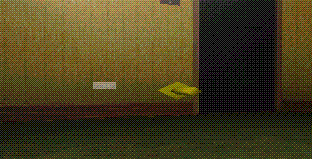


However, when you save the level and start a server with it in Multiplayer Mode, you will still start at the location you originally placed the Arrow.

There are 56 Objects that have the GRAV-Block in their files:

Of these, all have the 80 3F-ending, except the Ships and the Arrows.

ÿtd?